 Hob2D
Hob2D
A 2D game engine
A free and open-source engine for building 2D games - with a C++ core and gameplay scripted in Lua.


Rendering
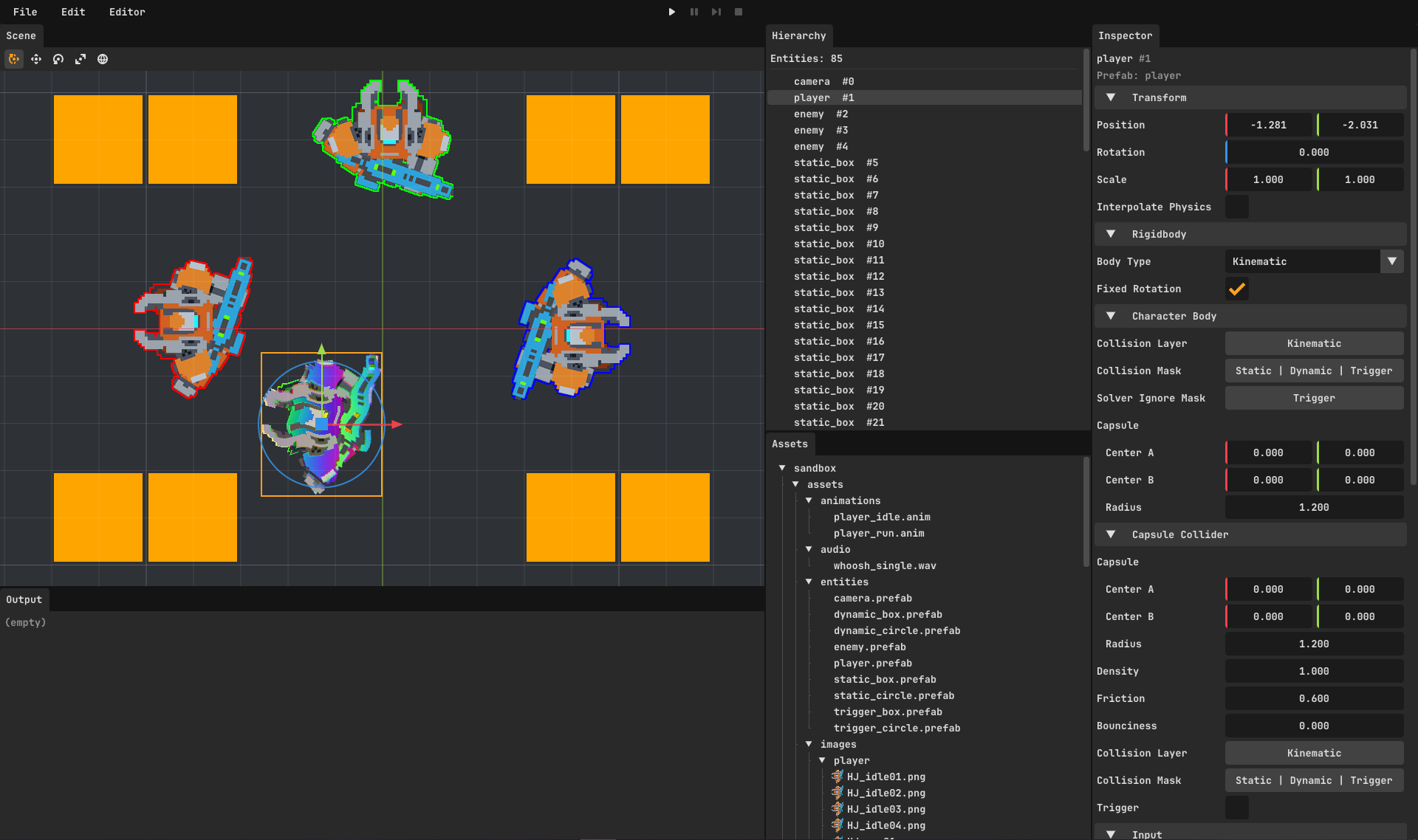
A modern 2D renderer powered by SDL3.
GPU-accelerated 2D pipeline
A modern 2D pipeline handles sprite sorting, drawing, and compositing on the GPU - then scales the result to any screen.
Materials & HLSL shaders
Per-material custom sprite shaders, authored in HLSL and cross-compiled at runtime - no offline build step.
Sprite animation
Define animation clips and play them per entity with a simple sprite animator.
Physics
Real 2D physics powered by Box2D.
Rigid-body simulation
Rigid bodies and colliders driven by a fixed-timestep loop with configurable sub-steps.
Raycasting & queries
Cast rays into the world for line-of-sight, ground checks, and gameplay queries.
Collision & trigger events
Components receive on_collision_enter/exit and
on_trigger_enter/exit callbacks automatically.
Entity & Components
A straightforward composition model: each entity owns a list of components.
Lifecycle hooks
Components hook into init, enter_play,
exit_play, tick, physics_tick, and more.
Composition over inheritance
Build behaviour by attaching components - mix and match without deep class trees.
C++ or Lua components
Write components in C++ for the engine core or in Lua for gameplay - both plug into the same lifecycle hooks.
Lua Scripting
All gameplay code is written in Lua, with hot reload while the game runs.
Component inheritance
Share behaviour across components with single inheritance.
Data-driven prefabs
Compose entities from component blocks as declarative data - no boilerplate constructor code.
Hot reload
Edit scripts, assets, and config and see changes without restarting the engine.
DefineComponent.Player = {
    speed = 7.0,
}
---@class Player : LuaComponent
local Player = Player

function Player:init() end
function Player:enter_play() end
function Player:exit_play() end

function Player:tick(delta_time)
    -- per-frame game logic
end

function Player:physics_tick(fixed_delta_time)
    -- fixed-timestep movement
end
DefineEntity.Player = {
    ticking = true,
    input = {},
    character_body = {
        collision_layer = Collision.Kinematic,
        collision_mask = Collision.Static | Collision.Dynamic,
        solver_ignore_mask = Collision.Trigger,
        capsule = Capsule(Vector2.zero(), Vector2.zero(), 1.2),
    },
    sprite = {
        texture = Textures.PlayerIdle01,
        material = Materials.WhiteOutline,
        z_index = 1,
    },
    -- attach the Player component
    lua_components = { Components.Player },
}
-- spawn the prefab at a world position
EntitySpawner.spawn_entity(Entities.Player, Vector2(0.0, 0.0))
UI
Build interfaces with RmlUi - HTML-like RML markup styled by RCSS, driven from Lua.
RML + RCSS
Author layouts in familiar HTML/CSS-like markup and stylesheets, hot-reloaded while the game runs.
RCSS transitions
Animate properties with CSS-style transition rules - no per-frame
tweening code.
MVVM data binding
Bind {{ fields }} to a view model; update it from Lua and the view
refreshes automatically - no manual DOM updates.
<rml>
<head>
    <link type="text/rcss" href="ui/healthbar.rcss"/>
</head>
<body data-model="player_hud">
    <div id="healthbar">
        <div id="health_fill" data-style-width="fill_width"></div>
        <span id="health_text">{{ health }} / {{ max_health }}</span>
    </div>
</body>
</rml>
#healthbar {
    position: absolute;
    left: 40px;
    top: 40px;
    width: 320px;
    height: 36px;
    background-color: #401010;
    border: 2px #000000;
}

#health_fill {
    width: 100%;
    height: 100%;
    background-color: #d03030;
    transition: width 0.2s linear-in-out;
}
function Player:enter_play()
    -- create the data model, then load the RML that binds to it
    self.hud_model = UI.create_model("player_hud", {
        health = self.health,
        max_health = self.max_health,
        fill_width = "100%",
    })
    self.hud_doc = UI.load_document("ui/healthbar.rml")
    UI.show_document(self.hud_doc)
end

function Player:set_health(value)
    self.health = math.max(0, math.min(self.max_health, value))
    local percent = math.floor(self.health / self.max_health * 100)

    -- update the model; the UI refreshes automatically
    UI.set(self.hud_model, "health", math.floor(self.health))
    UI.set(self.hud_model, "fill_width", string.format("%d%%", percent))
end
Input Mapping
Bind keys to named actions and axes in JSON - no rebuild to remap controls.
Named actions
Map multiple keys to a single action so gameplay code never references raw key codes.
Smoothed axes
Axis mappings blend opposing keys with configurable acceleration and deceleration.
{
  "action_mappings": {
    "jump":     ["Space", "W"],
    "interact": ["E"],
    "cancel":   ["Escape"]
  },
  "axis_mappings": {
    "horizontal": {
      "acceleration": 10,
      "deceleration": 10,
      "positive": ["Right", "D"],
      "negative": ["Left", "A"]
    }
  }
}
function Player:enter_play()
    local input = self.entity:get_input()

    -- react to a smoothed axis
    input:bind_axis("horizontal", function(axis)
        self.movement.x = axis
    end)

    -- react to a named action
    input:bind_action("jump", InputEventType.Pressed, function()
        -- ...
    end)
end